Less time investigating.
A photo or video, a description and the observation location are attached to the same incident. Additional information does not have to be found in separate message threads.
Measure: processing minutes per report
Platform
FAQVisual Data EngineAI & SearchEnterprise TechnologyProductsAwarenessCrowdsourceAnalyticsSmart SearchTrust EngineKuntapalveluDokumenttihakuLuontotietoCrowdsource Product TourPricingCrowdsourceKuntapalveluOther products – request a quoteIndustries
Sports Teams & FederationsEvents & Corporate ExperiencesAssociations & Member OrganizationsPublic SafetyCasinos & VenuesMedia & NewsroomsEnterprise MarketingCustomer StoriesCompany
AboutTeamPartnersContactNewsInvestorsA resident's photo shows what is happening on site. Awareness brings observations together, enriches the information with AI and adds it to the operator's view. Your existing staff receive more complete information for maintenance and incident assessment.
A ready-to-use service for your municipal website: embed, link or widget.
Where is the damage? What is broken? Do you need a lift, traffic management or one worker? Text-only feedback can leave the most important questions unanswered.
A photo or video, a description and the observation location are attached to the same incident. Additional information does not have to be found in separate message threads.
Measure: processing minutes per reportA local observation helps plan the inspection and the equipment needed. A photo does not replace mandatory safety inspections.
Measure: separate inspection and repeat visitsMaintenance staff, contractors and management can work with agreed shared incident information. The original material and uncertainties stay attached.
Measure: time spent passing information onWe deliver the reporting interface ready to use. A resident selects a topic and opens a BCaster photo submission link. The photo or video is submitted in the correct category for processing.
Agreed integrations can complement existing feedback and work management services. You can start with a reporting channel for a single use case.
Reporting options appear directly on the municipality's website.
A link from the municipal website opens a ready-made reporting page with the municipality's branding.
A reporting button opens a compact topic selector and a photo submission link.
The example page is not Heinola's official reporting channel. BCaster links and the dashboard are connected separately before production use.
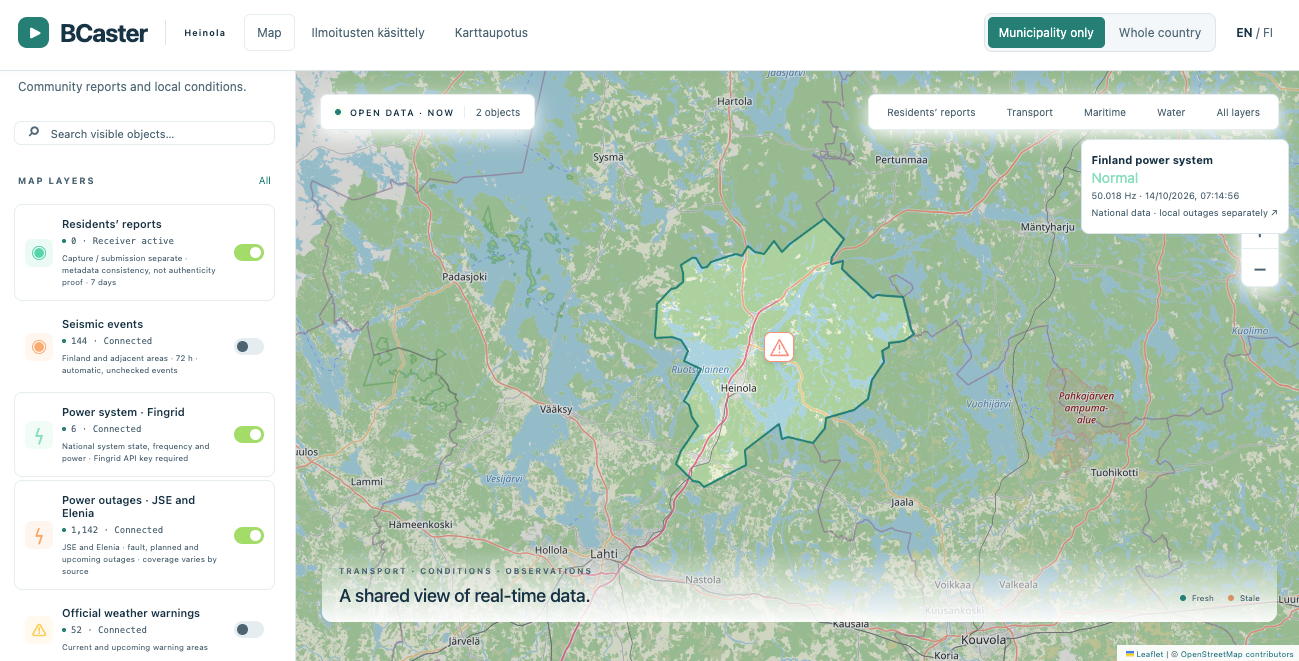
During deployment, we connect the municipality's different data sources to Awareness and a shared view: water services, district heating, electricity, data networks and other municipal services.
Information from cameras, sensors and alert systems, together with resident observations, adds to the picture. Municipal staff can see how conditions across different services relate to each other in one view.
During deployment, we map all data sources available to the municipality. The datasets to connect, interfaces and access rights are agreed with the municipality and data owners. Connections are implemented and tested as part of the agreed deployment.
The control panel makes it easy to choose which information and map layers residents see on the public map. The municipality can display disruption notices, blocked routes and completed repairs, for example.
The internal operational picture and the residents' map serve different needs. Only information selected by the municipality for publication is shown on the public map. Internal material, personal data and restricted infrastructure information remain protected by access controls.
Public map content and publishing permissions are defined during deployment.
The complete workflow is recorded in the incident history: the report, original photo or video, analysis, processing stages and repair confirmation. The repair worker adds an on-site photo of the completed work to the same incident.
The photo or video, location and report details remain attached to the original observation.
The operator's assessments, work assignments and status changes are attached to the same history.
The repair worker takes a photo on site. The photo, confirmation time and description document the reported repair; the responsible operator approves completion.
A repair update and approved photo can be published on the municipal website. The contributor's contact details and internal processing material are not published with it.
The history helps track processing times, check completion records and identify recurring problem locations. Before-and-after material supports later review.
Measure: time to repair, jobs confirmed with photos and reopened reports.“Repaired” says more when accompanied by a photo of the completed work. Public repair information can reduce repeat reports about the same issue and build trust in municipal services.
Measure: repeat reports, follow-up enquiries and satisfaction with handling.This is the intended service workflow. History, the repair worker's confirmation link and the municipal website publishing integration are connected to the dashboard during deployment. Retention periods and publishing practices are agreed with the municipality. A repair photo does not replace a required safety or quality inspection.
Choose the pricing tier that matches your municipality's population. The four-year total includes one setup fee and four annual fees. All prices exclude VAT.
| Municipality size | Population | Setup fee | Annual fee | Four-year total | Municipal procurement approach* |
|---|---|---|---|---|---|
| Small | Under 15,000 | €9,500 | €5,900 / year | €33,100 | Small-value procurement; an authorised official may decide within the municipality’s delegated powers |
| Medium | 15,000–50,000 | €14,500 | €7,900 / year | €46,100 | Small-value procurement under the municipality’s procurement rules |
| Large | Over 50,000 | €19,000 | €8,900 / year | €54,600 | Small-value procurement under the municipality’s procurement rules |
The four-year price comparison does not define a minimum contract term. Service scope, any additional services and integrations, and contract terms are specified in the quotation.
* In Finland, the procurement procedure and decision-making authority depend on the municipality's own rules and the total estimated contract value, including any options and additional services. Price alone does not guarantee a direct award or a decision by an individual official. More about small-value procurement in Finland (Finnish) ↗
€9,500 + 4 × €5,900 = €33,100 (excluding VAT). The municipality's own work and any other additional costs are assessed separately in the benefit calculator below.
Replace the assumptions with your municipality's figures. The calculator separates released staff capacity from the estimated cost of avoided visits. The default service price is the Small tier above: €9,500 setup and €5,900 per year. Report volumes, staff-time benefits and fewer visits are editable example assumptions, not a savings guarantee. All monetary figures exclude VAT. Potential additional benefits from repair history and public completion updates are not included.
Check the calculator values. Use the limits shown in each field.
INDICATIVE ESTIMATEReleased staff time is capacity, not an automatic reduction in payroll costs. The calculation does not assume a disaster is prevented or a disruption shortened. Benefits are verified in a pilot.
When residents, staff and partners use the reporting channel in everyday situations, the same workflow can be used during a storm, flood or disruption affecting several services.
A photo request can ask for an observation of a blocked route or the area around a municipal building, for example. Requests are limited to safe tasks.
Resident observations can be considered alongside municipal cameras, sensors and other agreed sources. Management gains a clearer view of the effects on services.
The chain from a request to an observation and a responsible operator's assessment can be tested in an exercise. Information delays and the usefulness of observations can be measured at the same time.
In Finland, municipalities' general preparedness duty is set out in Section 12 of the Emergency Powers Act. Awareness can support information collection, situational awareness and exercises as part of the municipality's own preparedness. Purchasing software alone does not fulfil that duty.
Association of Finnish Municipalities: preparedness and security (Finnish) ↗Observations from the municipality, water utility, electricity network operator and maintenance partners can be combined as agreed. A blocked route and a network outage together may help explain the scale of a disruption.
When the same information reaches the right parties, it can support the protection of critical infrastructure and service continuity. An individual fault or report does not itself establish a hybrid threat.
Residents are informed about how their data will be used. National cooperation is built with agreed participants; deployment does not automatically connect the municipality to a public-authority network.
AI compiles and enriches observations in the background. The operator sees sources and uncertainties and decides what happens next. A pilot verifies that the new channel does not create an unmanageable workload.
Deployment can be designed for on-premises servers, a private cloud or a cloud service. Storage, AI processing, access rights and connections are defined together.
Municipal owner: technical services. Involve operators, IT, data protection and the person responsible for preparedness.
Let's choose one report type and show how photos, location and AI background work support your existing staff — in everyday operations and during disruptions.